How to Start A Blog in 60 Minutes: Earn Money With Blogging
Start A Blog in 60 Minutes & Earn Money With Blogging

In this post I’m going to walk you through everything you need to know about how to start your own blog and earn money with blogging. Even if you’ve never made a cent online before, and don’t know what affiliate marketing is, I can show you how to start building your own blog. To help you get started, Here is a guide how to start a blog and earn money with blogging for beginners.
How To Blog in 60 Minutes: Earn Money With Blogging
Learn how to create a blog in about 60 minutes following these steps:
What is Affiliate Marketing?
In simple terms, affiliate marketing is when you earn commissions for recommending products/services to readers (or people you know). This is done by joining affiliate networks, where you get unique links (tagged with your personal ID) that tracks whenever your links convert to a sale. If someone out there buys something through your link, it rains money. Or, well, usually a small percentage of the sale, but it’s a start!

Affiliate marketing as a monetization stream is perfect for bloggers, because we recommend things on a daily basis. It’s also a largely passive way to make money, which frees up your time to do other cool things, like travel and eat your weight in pie. Long story short: affiliate marketing is one of the best ways to monetize your blog, so you should read on to learn all about it!
Step 1 – Find Your Niche
Before you start even preparing your first site, you will need to decide which niche you are about to focus.
And of course, you they can not build a site around, without knowing what their site is about…right?
In case you are at a loss on what to blog about, you can get there by one of the following methods; how to find a good blog niche:
- Hobbies & passions. Working on a passion is very easy as opposed to working on something you are not passionate about. There is no better place to begin than this, hobbies or other interests which you are mad about. Some of the typical examples are cooking, traveling, fashion, sports and cars. However the success of even the less popular hobbies in blogs with your audience literally everyone in the world surfing the internet can be successfully accomplished.
- Is there money in this niche? While following your passion is definitely the recommended option, the prospect of making money in a lucrative niche out-smarts passion in some cases. You may not always actually know much about your niche but so long as there is a chance that you can make something out of it you can always learn more about your niche right?
- Are there affiliate programs available in this niche? This is obviously a crucial factor to consider. You might come up with an idea for a niche you know a lot about, but are there affiliate programs for the niche? No affiliate program = no sales. Time to look for a different niche.
- Is there enough interest in/demand for products in this niche? The niche you choose might draw enough interest from your audience when it comes to reading and acquiring knowledge, but are they willing to buy relevant products too? Without consumer interest in products, your niche isn’t going to make you much money.
Step 2 – Registering a Domain Name & Hosting
If you’re a newbie to building sites, the simplest process to building a site is through the use of WordPress. The WordPress CMS is very easy to use and while coding skills can come in handy, for the most part you will not require any tech knowledge to set up your site.
You need to follow a few steps to have your site up and running:
- Purchase a domain name.
Your domain is the address for your site (e.g., www.affilorama.com) is what is known as your domain so this is the first thing you will need to do when getting your site situated. Given the millions of sites online, it is possible that the domain name that you wish to has already been grabbed by another company. So make sure you have several options in mind. Be sure to read our advice on how to choose a good domain name.
There are several places you can buy a domain, including our very own Affilorama Domain service. Other well known options are: GoDaddy and NameCheap.
- Set up web hosting.
Some affordable and reliable hosting providers we recommend are GoDaddy, HostGator and BlueHost.
If you purchase your domain and hosting from different companies, you will need to link the two together. Don’t panic, it’s a simple process. Check out this lesson: Linking your Domain with Your Hosting.
The hosting provider I recommend, and the one I show you how to use in this guide, is BlueHost. I personally use BlueHost and I recommend them for all new bloggers because:
- They will register your blog name for you for free, making sure no one else can take it.
- They offer a free, simple installation of the WordPress blogging software (which I show you how to use in this guide).
- They have been recommended by WordPress since 2005 and currently host over 2 million blogs and websites.
- They have helpful 24/7 customer service via phone or web chat.
- They have a money-back guarantee if you are unsatisfied for any reason.
Select your plan. I recommend the basic plan. Click “Select” to choose your plan.

Type in your domain name in the left box and then click “next” to start the registration process.
If you already own a domain name and want to use it for your blog, type your existing domain in the right box and then click “next”. Only use the right box if you have previously paid to register a domain!

Once you have done all that you will be asked to put in your details and payment details.

You will also need to choose your hosting package and options.
- The 36-month package gets you the lowest monthly rate, while the 12-month package will have a lower up-start cost. Remember, you can cancel anytime.
- I uncheck the boxes beside the other products when signing-up. You can always get these products later if you decide you need them.

- Install WordPress.
This step is also easy with a few clicks of a button to get started. After you have finished setting everything up and running to host whatever you should have got a welcome mail with a few logins.
The following is the step by step instructions of how to install WordPress on Bluehost:
1) Go into your Bluehost control panel at: my.bluehost.com
2) Once you’re logged in, you’ll be redirected to your Control Panel. From there, choose “Install WordPress”.

In the next screen, you will be requested to select the domain within which you want to install WordPress on. I would now recommend you set in your root domain (www.YourNewDomain.com, not www.YourNewDomain.com/blog/), so you may just leave fixed field on the right as empty.

The final step is super easy but make sure you have “show advanced option” enabled. This will let you choose your login username as password.


Now your blog platform (WordPress) will be installed. Once the install is complete click “Start Building” to be logged-in to your blog.
You should also receive an email with your blog log-in details. (NOTE: The login details for your blog will be different than for your BlueHost account.)
Step 3 – Setup Your Blog Platform

To start with, you will need to login to your blog. Go to http://www.yourblog.com/wp-admin to bring up the login screen (replace “yourblog.com” with your domain name). Some of you may not remember your login name or password so in this case check the email that was sent to you by BlueHost that has this information.
Once you’re inside WordPress dashboard, you can start customizing your blog.

- Install your theme.
A WordPress theme provides all the styling of a site that you (and your audience) see on the front end. Themes available are in thousands and therefore the initial peek at the themes list might seem intimidating. What we would recommend: keep it simple and simple to tailor. It can always be changed later on.
The OceanWP is a great option. Completely customizable, and built specifically for affiliate marketers, you can use this WordPress theme to bypass much of the initial learning curve other affiliate marketers will experience. You can also search for themes on a site like Theme Forest.
To change your theme you are going to click on the “Appearance” tab on the left menu.

Unless you have a very specific design in mind for your blog, I suggest you use one of these themes to start with.

If you don’t like any of the themes that are already installed you can easily choose from thousands of other free themes. To install a new theme, click on the “Appearance” tab on the left menu and then click “Add New”.

Now you can browse the themes that have the characteristics that you want. When you find one that you like click the blue “Install” button.
After the theme has been installed proceed with clicking on the Activate button to activate the theme on your blog. To get a preview of your new theme, simply visit your blog and have a look!
- Create content.
Finally, once your site is ready, it’s time to create content for it. The material you produce should be both appropriate to your niche and of a degree of interest and entertainment that your readers will feel compelled to come back to their content. It is also necessary to ensure that the content of the site is friendly to your search engine.
Now that your blog is up and running it’s time to actually do some blogging!

Go to the left menu and click on “Posts”.

You will see there is already a post there. This is a default post on every new WordPress blog, and we don’t need it. To delete it click “Trash” just under the post.

To begin writing a new post, click the “Add New” link.

You are now on post editor. In the top field, input the title of your post and then start writing your post in the bottom field.

If you would like to add a picture to your post, click on the “Add Media” button and click “Select Files” to upload a picture from your computer. You can make adjustments to the picture size on the next screen. When you are ready click “Insert into post” to add the picture.
Once you have finished your post just click the “Publish” button on the right side of the screen to publish it.
Publishing Your Blog
Even after you have written a post your blog may still be showing a “Coming Soon” page.
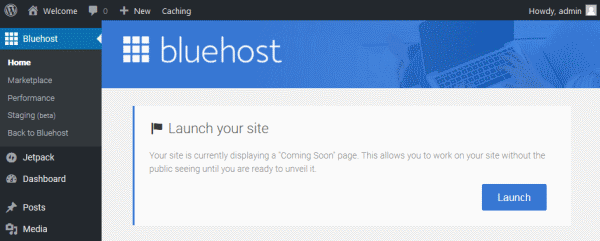
When you are ready to make your blog public just click the “BlueHost” menu at the top left of the menu in your administrator area then click the blue “Launch” button to remove the “Coming Soon” page.
Congratulations! You now know how to start your own blog and publish content!
Step 4 – Ways to Get Paid
Google Adsense
Google Adsense is another popular way to monetize your blog. It is one of the most profitable ways to earn automated income for your blog in all actuality. Simply go to Google Adsense Start Page fill out the info, and you are on your way. You will be placing ads in no time, it takes some practice, but you will figure it out quickly.
Amazon Affiliate Links
One of the first and most common places bloggers become affiliates at is with Amazon’s Affiliate Program. The reason for that is because they sell practically EVERYTHING. So whether you’re blogging about cameras, clothes, pet detergent, you name it, you can monetize your blog with Amazon. Simply sign up, fill out the info and you’ll have links and banners, and even store pages at your finger tips!
Other Affiliate Networks
Now there are other programs, and I will share with you two affiliate sites I use in creating profitable blogs. The first is FlexOffers, which is an Australian based affiliate network. Almost any product you can think of is offered here. And secondly I use ShareASale. Both programs are great.
Step 5 – How to Promote Affiliate Offers
Here are some ideas:
- Build an email list.
Let no one tell you that email marketing is dead. An email list is crucial for every affiliate marketer. You can start building up your email list with a lead magnet (like the information products mentioned previously) or even just by encouraging your audience to sign up for your updates. You can then push your content to this audience via email and also direct them to your affiliate offers. Don’t be sleazy about the sales, but if you build up enough trust with your email audience; when the time comes, they will not mind purchasing a product from you.
- Promote your content via social media.
Social media is the simplest and most popular method of commencing to build an audience to a web site. Facebook, Twitter, Instagram, Pinterest as well as other niche and location-specific networks are all possibilities, depending on your niche and industry. Building up an engaged and interested following on social media is a great opportunity to build relationships and once you have their trust, promote your products and services to them.
- Use basic SEO strategies.
Organic search is still a significant source of traffic to any web site, so it’s important that you optimize your website for search engines as well. When creating your content, you must always do so keeping the reader in mind first, but don’t forget to follow a few basic SEO principles as well.
Either learn how to do SEO, or get a nice SEO marketer to help you to maximize on-page and off-page SEO opportunities on your site. When your site begins to show in search results of a term related to your niche, it will be a tremendous push towards audience building (as well as your sales)!
- Product reviews.
Write honest, real reviews about products. Gradually gain the trust of your audience and also keep in mind that they depend on you. Make sure you do the positive aspects of a product and downplace the negatives. Honest opinion will be appreciated. Include interesting pictures and mention useful features, specifications and other details.
Your product review can then link to the page (with your affiliate ID attached), where your audience can make a purchase if they’re interested. If do, hooray! You’ve made your first sale.
- Invest in paid advertising.
Many affiliate marketers use paid advertising to generate additional traffic to their site and drive more sales. Advertising through paid social media, particularly those that are more economical, can often be the best place to begin advertising. You might also wish to consider placing low-cost on small niche websites of banner ads. Google AdWords may also be a sensible choice depending on your niche to get some paid traffic to your site.
The Bottom Line: Earn Money With Blogging
These are five steps on how to start a blog and make money with blogging for beginners. It may get overwhelming to do everything to install your site and create an online profile. However, once you’ve made that first sale, all the hard work will be worth it. As you may notice, there is a time-tested approach as far as affiliate marketing beginners are concerned.
I hope that this step-by-step guide on how to make a profitable blog, you can start making your own blog. I know that was a lot of information, but if you’ve been struggling with figuring out how to start monetizing your blog, then the above strategies will be an excellent starting point.
Frequently Asked Questions: